PPC HANIFGoogle Ads & Tracking Solution
Case Study · E-commerce, UK

Server-Side Tracking Case Study for E-commerce BusinessWeb + Server GTM, Working Together

Browser-based tracking loses data every day to ad blockers, Safari's tracking prevention and short cookie lifetimes. This case study shows the server-side tracking setup built for a UK e-commerce store: a web Google Tag Manager container that captures every key shopping event, and a server container that receives those events through the GA4 client and forwards them to Google Ads and GA4.

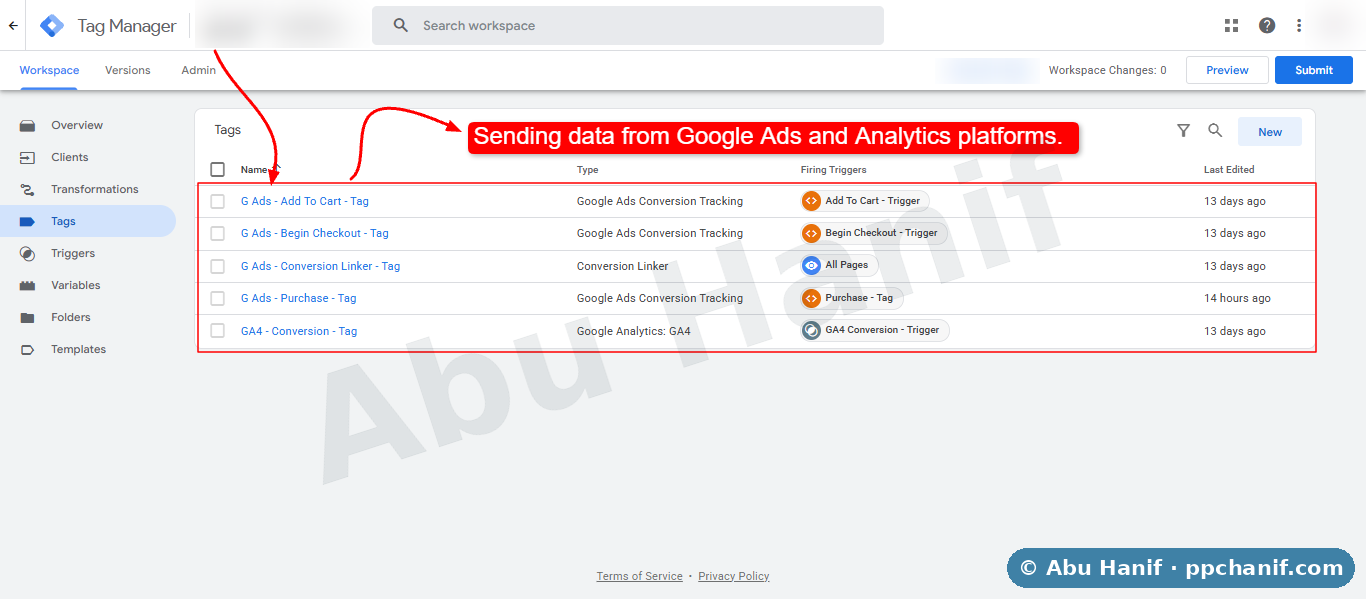
Web Google Tag Manager container for a UK e-commerce store with GA4 events and Google Ads conversion tags sending data to the server through the GA4 client

12

Web Tags

5

Server Tags

Web + Server

Containers

Step 1: the web container captures ecommerce events and sends them through the GA4 client. Step 2: the server container forwards them to Google Ads and GA4. Store domain and container IDs hidden for client privacy.

Before

The Starting Problem

All tracking ran in the visitor's browser. Every add to cart, checkout and purchase depended on third-party scripts loading correctly, so ad blockers and browser privacy features quietly removed part of the data. Google Ads saw fewer purchases than the shop recorded, and Smart Bidding was optimising on an incomplete picture.

After

The Fix

We split tracking into two Google Tag Manager containers. The web container captures the ecommerce events and sends them through a single GA4 stream to a tagging server. The server container receives them with the GA4 client and sends the conversions to Google Ads and GA4 from the server, alongside a server-side Conversion Linker.

01

What Server-Side Tracking Is

With normal tracking, the visitor's browser sends data directly to Google Ads, GA4 and every other platform. With server-side tracking, the browser sends one stream of data to a tagging server that you control, and that server sends the data on to each platform.

Because the browser only talks to your own server, far fewer requests are blocked, cookies can be set in a first-party context that lasts longer, and you decide exactly what data each platform receives.

02

Why This Store Needed It

  • Ad blockers and Safari tracking prevention were removing a share of add to cart, checkout and purchase events
  • Google Ads purchase conversions were lower than real orders, so reported ROAS was understated
  • Smart Bidding had less data to learn from than the store actually generated
  • Every new platform meant adding another script to the website, slowing it down
03

Step 1: The Web Container

The web container on the store captures the full ecommerce journey with custom event triggers fired from the site's data layer.

  • GA4 Config (Google Tag) on every page view, configured to send data to the tagging server instead of directly to Google
  • GA4 events for page_view, view_item, add_to_cart, begin_checkout and purchase, each with full item and value data
  • Google Ads Config plus Add To Cart, Begin Checkout and Purchase conversion tags, and a Conversion Linker
  • Microsoft Clarity for session recordings and heatmaps of the shopping journey
04

Step 2: The Server Container

The server container receives the GA4 requests through the GA4 client, then each tag decides where the data goes. This is where the data is sent on to the ad and analytics platforms.

  • GA4 client claims the incoming requests from the website
  • GA4 tag forwards events to the GA4 property from the server
  • Google Ads Add To Cart, Begin Checkout and Purchase conversion tags send the same events to Google Ads
  • A server-side Conversion Linker keeps the ad click ID so each conversion is credited to the right click
05

How the Data Flows

  • A shopper views a product, adds it to the cart, starts checkout and places an order
  • The data layer on the store pushes each of those events with product, value and currency data
  • The web container sends them through the GA4 stream to the tagging server on the store's own subdomain
  • The server container's GA4 client receives them, and the server tags pass them to Google Ads and GA4
  • Google Ads and GA4 both receive the same events, so their numbers line up with each other and with the shop
06

How Everything Was Tested

  • Web container checked in GTM Preview mode by viewing products, adding to cart, starting checkout and placing test orders
  • Server container Preview used at the same time to confirm each request was claimed by the GA4 client and every tag fired
  • GA4 DebugView and Realtime used to confirm events and purchase values arrived correctly
  • Google Ads conversion diagnostics checked to confirm add to cart, begin checkout and purchase were all recording
07

What This Gives the Business

Conversion data now travels through the store's own server, so far less of it is lost to blockers and browser restrictions. Google Ads and GA4 receive the full shopping journey from one consistent source, Smart Bidding learns from more complete purchase data, and new platforms can be added on the server without adding more scripts to the website.

FAQ

E-commerce, UK: Common Questions

What is server-side tracking in Google Tag Manager?

It is a setup where a server GTM container, running on your own tagging server, receives data from your website and sends it on to platforms like Google Ads and GA4, instead of the visitor's browser sending data to each platform directly.

What does the GA4 client do in a server container?

The GA4 client receives the GA4 requests sent from your website, reads the event data and makes it available to the server tags, which then forward it to Google Ads, GA4 or other platforms.

Do I still need a web GTM container with server-side tracking?

Yes. The web container captures events on the website and sends them to the server. The server container then processes and forwards them. Both work together, as shown in this case study.

Is server-side tracking worth it for a small online store?

It is most valuable once ad spend is high enough that lost conversions affect bidding and reporting. Smaller stores should first make sure standard purchase tracking and Enhanced Conversions are correct, then move to server-side tracking.

Want This Approach for Your Account?

Start with a free 30-minute audit. You will see what is working, what is wasting budget and what I would fix first.